ICT Trading Journal Template: What to Track in Every Trade
Every field of an ICT trading journal template: bias, draw on liquidity, PD array, Kill Zone, execution, R, mistakes and screenshots, with an example.
An ICT trading journal template needs fields a generic one leaves out: the daily bias, the draw on liquidity, the PD array you entered from, the Kill Zone and whether liquidity was swept first. This page lists every field, grouped into pre-trade, execution and post-trade, so you can copy the layout into a notebook, a spreadsheet or LSG Club’s free trading journal. Under the lists you will find a filled example and a weekly routine for using it.
The goal is not to record everything. It is to record the few facts that decide whether an ICT trade was valid, in the same format every time, so that after fifty or a hundred trades you can see which conditions your results actually depend on.
Why a generic template misses ICT data
A standard template stores entry, exit, size and profit. That is enough to compute a win rate, but not to explain it. Two losing trades on EURUSD can have completely different causes: one was a valid setup that simply failed, the other was taken against the daily bias, in premium, after the Kill Zone had ended. Without context fields they look identical.
ICT trading is conditional: bias, location, timing and a liquidity event must line up before entry. A template built for it records each condition separately. That lets you filter later, for example "only trades in discount, after a sell-side sweep, inside the London Kill Zone", and compare that group with everything else.
Pre-trade fields in the ICT trading journal template
Fill these before the order goes in. If any of them is blank, that is information too: it usually means the trade was impulsive.
Context: daily bias and draw on liquidity
- Instrument — the symbol exactly as your broker names it, so imports match.
- Daily bias — bullish, bearish or neutral, decided before the session. Our guide to determining ICT daily bias covers the process.
- HTF narrative — one sentence from the daily and H4 chart, such as "rebalancing the H4 FVG, then targeting the previous week high".
- Draw on liquidity — the specific pool you expect price to reach: buy-side above a high or sell-side below a low.
- Weekly profile or Power of 3 phase — optional; accumulation, manipulation or distribution if you track AMD.
Location: dealing range and PD array
- Dealing range — the swing high and low you measured premium and discount from.
- Price zone — premium, discount or equilibrium (the 50% level of that range).
- PD array — the exact array you entered from: order block, fair value gap, breaker, mitigation block or OTE zone. See ICT PD arrays explained for the full list.
- OTE level — if used, where the entry sat in the 62–79% retracement, with 70.5% as its middle.
Timing and trigger: Kill Zone and liquidity event
- Kill Zone — Asian, London, New York or outside a Kill Zone. ICT defines them in New York time (London 02:00–05:00, New York AM 07:00–10:00), and the LSG journal tags trades by the same New York-time windows, daylight saving included. Pick one convention and keep it. More in the Kill Zone trading guide.
- Liquidity swept — which level was raided before entry (Asian high, previous day low, equal highs) or "none".
- Structure confirmation — market structure shift on the entry timeframe, with displacement: yes or no.
- Checklist score — how many of your entry criteria were met, for example 6 of 7.
- Setup name — one label from a fixed list, so filters work.
Execution fields
Execution fields are mostly numbers. If you import broker history, the prices and times arrive by themselves; you only add the planned levels.
- Entry time and price — the fill, not the planned price.
- Stop loss — the price and the logic behind it, such as "below the sweep low".
- Target — the price and the liquidity it aims for; add partial targets if you scale out.
- Planned risk — in account currency and in percent of the balance.
- Planned risk-reward — target distance divided by stop distance.
- Position size — lots or units, so the risk can be verified.
- Order type — market, limit or stop entry.
- Management — what you did after entry: moved to break-even, took partials, trailed, nothing.
Record management decisions honestly. Many results change during the trade, not at entry, and a field for "moved stop to break-even at 1R" is what later lets you test whether that habit helps or hurts.
Post-trade fields
Outcome in R
- Exit time and price — and the reason: target, stop, manual close, time exit.
- Result in R — profit or loss divided by the initial risk. R makes trades of different sizes comparable; our article on risk-reward in ICT trading explains why it matters more than the dollar figure.
- Result in money and percent — for the account record and prop-firm limits.
- Maximum favorable and adverse move — how far price went for and against you, if you track it.
Mistakes and rule breaks
- Plan followed — yes or no.
- Mistake tags — from a fixed list: against bias, entered in premium for a long, no sweep, outside Kill Zone, moved stop, oversized, revenge trade.
- Emotion before and after — one word each; patterns appear only with consistent words.
- Lesson — one sentence that you could turn into a rule.
Screenshots
- HTF screenshot — daily or H4 with the dealing range, the draw on liquidity and the bias marked.
- Entry screenshot — the entry timeframe with the sweep, the structure shift, the PD array, the stop and the target.
- Exit screenshot — taken after the trade, showing what price did next.
The exit screenshot is the one traders skip and the one that teaches most, because it shows whether your target was realistic and whether the stop was in the right place.
Example: one trade logged with the template
Example for illustration only, not a recommendation. EURUSD, bias bullish from the daily chart, draw on liquidity the previous day high. During the London Kill Zone price runs the Asian low (a sell-side sweep), then displaces up and breaks the M15 swing high: a market structure shift. It leaves a fair value gap in the discount half of the London dealing range. Entry is a limit order in that gap, stop below the sweep low, target just under the previous day high.
Logged fields: bias bullish; DOL previous day high; zone discount; PD array M15 FVG; Kill Zone London; liquidity swept Asian low; MSS yes; checklist 7 of 7; planned RR 3.0. The trade reaches 2R, you close half and move the stop to break-even, and the rest is stopped at entry. Result: +1.0R, plan followed, mistake tags none, lesson "test holding the runner without break-even on London sweeps". That last line becomes a question for the "what if" replay, not an immediate rule change.
How to use the template week by week
- Fill the pre-trade fields before every entry, even on demo; a blank field is a warning sign.
- Add execution and post-trade fields within minutes of the close while you remember the reasons.
- At the end of the week, group trades by setup, Kill Zone and price zone and compare average R between groups.
- Count mistake tags and their total cost in R; pick the most expensive one as next week’s single focus.
- After about fifty trades of one setup, review whether the conditions you require (sweep, MSS, discount) actually separate winners from losers.
- Change the template rarely, and note the date of each change so older data is read correctly.
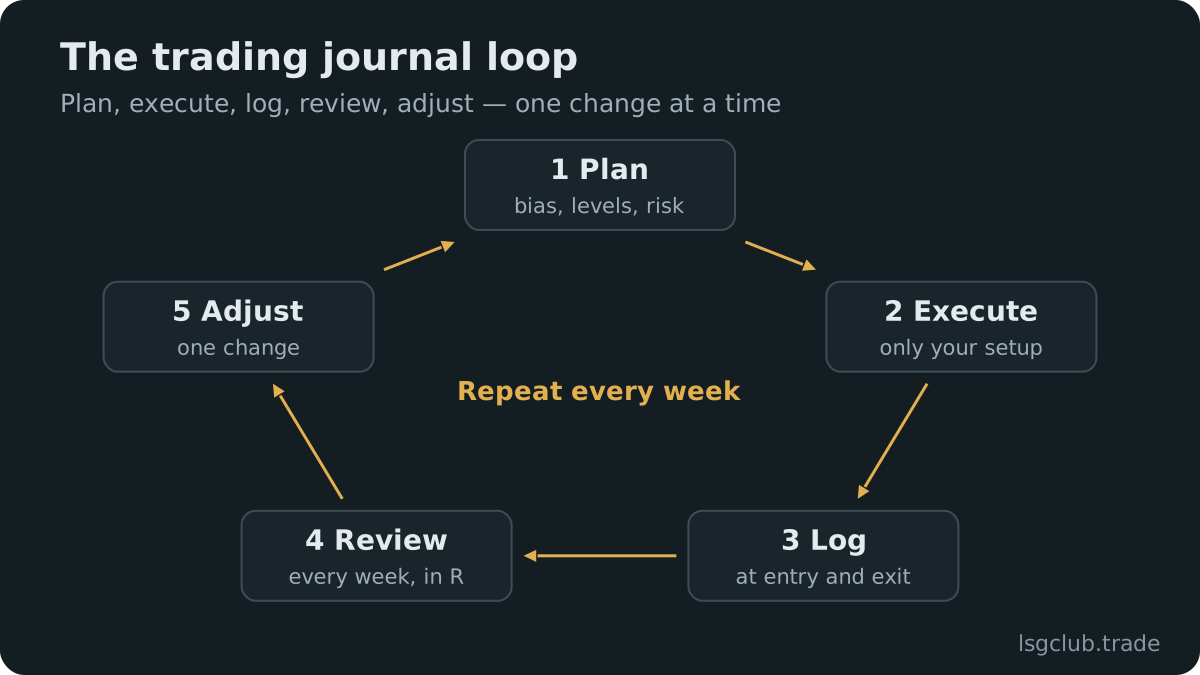
The weekly trading review walks through this step in detail, and the journaling habits guide covers how to keep filling the template on busy days. A ready-made version with these columns is available as a free trading journal template in CSV for Excel and Google Sheets.
FAQ
What should an ICT trading journal include?
At minimum: daily bias, draw on liquidity, price zone, PD array, Kill Zone, liquidity swept, entry, stop, target, result in R, mistake tags and screenshots. These fields let you test whether the ICT conditions you require actually improve your results.
Can I use this template in Excel or Google Sheets?
Yes. Make each field a column and use drop-down lists for setup, Kill Zone, zone and mistake tags so the labels stay consistent. Screenshots and chart replays are harder in a spreadsheet, which is the main reason traders later move to a dedicated journal.
Should I log Kill Zones in New York time or UTC?
Either works if you are consistent. ICT teaches the windows in New York time, so logging in New York time keeps your tags identical to the definitions all year; logging in UTC means the hours change by one when US daylight saving starts or ends. The LSG journal tags Kill Zones in New York time and shows the times in your own time zone.
How many fields are too many?
If filling one trade takes longer than five minutes, the template is too long to keep using. Start with the core ICT fields and add others only when you have a question that needs them.