TradeZella Alternatives for ICT Traders (2026): An Honest Comparison
A fair comparison of TradeZella, Edgewonk, TraderSync, Tradervue, TradesViz and LSG Club: price, free plans, MT4/MT5, R, ICT tools, AI, prop and mobile.
If you are looking for TradeZella alternatives as an ICT trader, there is no single winner. TradeZella itself has the deepest ICT backtesting and replay of the journals compared here; TraderSync and TradesViz have mobile apps and broad broker support; Edgewonk is a once-a-year purchase built around analytics; Tradervue is a simpler option built on report uploads; and LSG Club gives ICT and SMC traders a journal that is free forever, with Kill Zones and results in R built in. Every competitor fact below comes from the vendor’s own pricing and feature pages as of October 2026. Prices and plans change often, so check the current terms before you pay.
How this comparison was made
We are LSG Club, so read this with that in mind. We compared six journals on nine criteria, used only what each vendor states about itself, and wrote "not found" where a feature did not appear on the pages we checked rather than claiming it does not exist. Where a competitor is stronger, we say so.
TradeZella alternatives at a glance
- TradeZella — from $35 a month; the strongest ICT backtesting and replay here.
- Edgewonk — $197 for 12 months; deep behaviour analytics, no AI found.
- TraderSync — from $29.95 a month; mobile apps, market replay, an AI assistant.
- Tradervue — from $29.95 a month; MetaTrader by report upload, read-only mentors.
- TradesViz — free for stocks, paid plans from $19.99 a month; mobile apps, AI coach.
- LSG Club — the journal is free forever; Kill Zones, ICT setups and R built in; LSG Pro $29 a month.
Side-by-side comparison
Read the lists below as a comparison table: one criterion at a time, six journals in the same order.
Price, free plan and refunds
- TradeZella — Essential $35/mo or $315/yr ($26/mo), Pro $59/mo or $531/yr, Ultra $99/mo or $891/yr; yearly billing saves 25%, under pricing in place since July 14, 2026. The pricing page does not state a free plan or a trial.
- Edgewonk — one plan at $197 per 12 months, VAT extra (promotions are sometimes shown); no monthly plan and no free trial, but a 14-day money-back guarantee.
- TraderSync — Pro $29.95/mo or $269.52/yr, Premium $49.95/mo or $449.52/yr, Elite $79.95/mo or $719.52/yr; a 7-day free trial with no card; all sales are final.
- Tradervue — Silver $29.95/mo, Gold $49.95/mo; one version of its pricing page shows a free Basic plan for up to 30 trades a month; a 7-day trial, with the card charged when it ends.
- TradesViz — Basic $0 forever with no card (stocks only, one account, 3,000 executions a month), Pro $19.99/mo ($14.99/mo billed yearly), Platinum $29.99/mo ($22.49/mo yearly); a 7-day trial; no refunds.
- LSG Club — the journal, analytics, planning, report import and the Telegram bot are free forever, with no card and no trial clock; LSG Pro is $29/mo or $290/yr; MT4/MT5 auto-sync of a single account is $9/mo on its own; LSG Funded is $99/mo.
For a forex or gold trader, note that the free TradesViz plan covers stocks only, so the realistic comparison there is with its paid plans.
MT4/MT5 connection and other platforms
- TradeZella — MT4/MT5 auto-sync with the investor password, plus file upload; also cTrader, DXtrade, Match-Trader, NinjaTrader, Tradovate and Bybit; 500+ brokers claimed.
- Edgewonk — MT4 auto-sync through an FTP report every 60 minutes, MT5 through a read-only EA; many brokers, including prop firms such as FTMO, crypto exchanges, cTrader and NinjaTrader.
- TraderSync — MT4/MT5 auto-sync with the investor password; 700+ brokers claimed; stocks, forex, crypto, futures and CFDs.
- Tradervue — MT4/MT5 by HTML report upload; we found no MetaTrader auto-sync. Stocks, options, forex and futures.
- TradesViz — MT4/MT5 auto-sync (FTP, and a non-FTP route for MT5) and many crypto exchanges.
- LSG Club — free MT4/MT5 HTML or CSV report import with duplicates skipped; MT4/MT5 auto-sync with the read-only investor password, new MT5 trades every hour and MT4 every 12 hours (a club contribution, or up to 3 accounts with LSG Pro); CSV import from cTrader, MatchTrader and DXtrade; history from eight crypto exchanges through a read-only API key.
If you trade futures on NinjaTrader or Tradovate, TradeZella and Edgewonk cover platforms that LSG Club does not import. Step-by-step MetaTrader import is in our guide to importing MT5 trades into a journal.
Results in R
- TradeZella — an R-multiples report.
- Edgewonk — R-multiple statistics.
- TraderSync — not covered on the pages we checked; confirm it during the trial.
- Tradervue — R units on the Gold plan.
- TradesViz — an R toggle.
- LSG Club — every result in $, % or R, calculated from the initial risk, on every plan including the free journal.
Why R matters more than the dollar figure is explained in win rate vs risk-reward.
ICT, sessions and Kill Zones
- TradeZella — the most ICT-specific of the paid journals: a session shading indicator for New York, Asia and London, an ICT FVG indicator, and an AI backtester that understands BOS/CHoCH, fair value gaps, order and breaker blocks, liquidity sweeps, premium/discount and OTE.
- Edgewonk — session report cards, setups, tags and checklists; no Kill Zone feature found.
- TraderSync — no ICT-specific tooling found on the pages we checked.
- Tradervue — no ICT-specific tooling found.
- TradesViz — no ICT-specific tooling found on the pages we checked.
- LSG Club — the Kill Zone is set from the entry time in fixed UTC windows; Order Block, FVG, Breaker, Mitigation and Liquidity Sweep are ready-made setups; analytics by Kill Zone, session, setup, weekday and hour; Kill Zone alerts in Telegram; a free Kill Zone time converter; an ICT guide in the learning library.
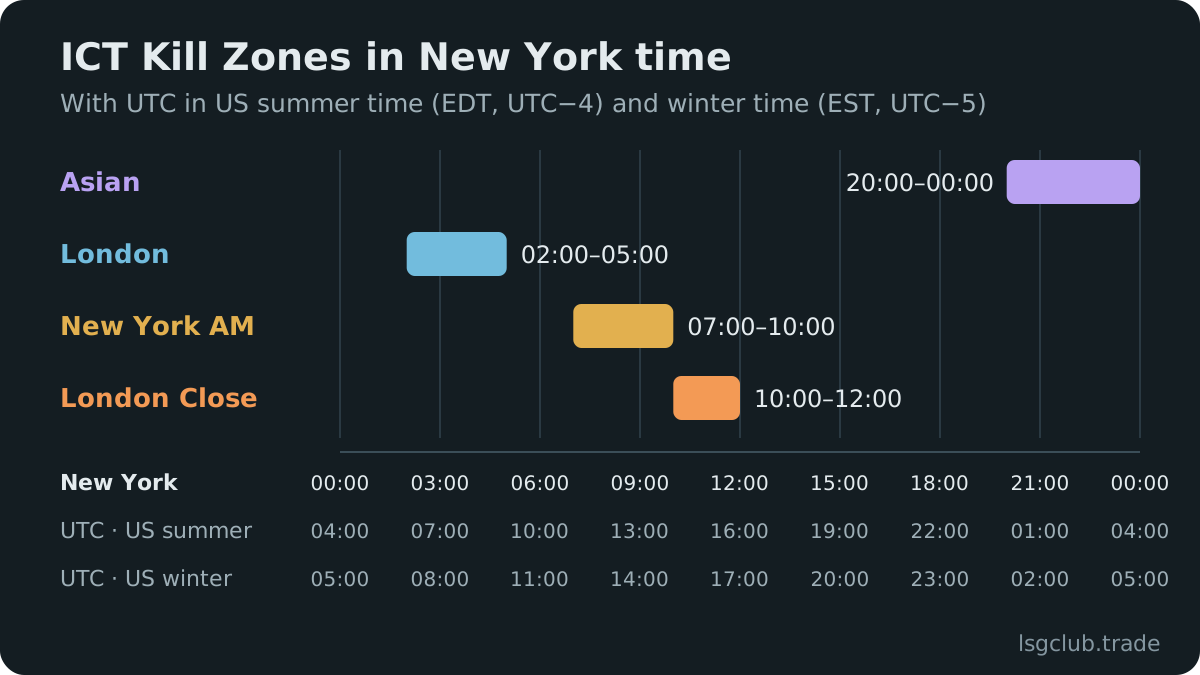
The difference is where the ICT work happens. TradeZella brings ICT concepts into its backtester; LSG Club builds them into the daily journal, so your own trades are grouped by Kill Zone and setup without extra tagging. The windows themselves are explained in the Kill Zone trading guide.
AI features
- TradeZella — Zella AI credits, AI agents on the Pro and Ultra plans, and AI backtesting from rules written in plain English (the pricing page lists 1, 10 and 100 runs).
- TraderSync — the Cypher AI assistant (5, 15 or 60 messages a day, depending on the plan), Cypher Coach on Elite, and automated backtesting.
- TradesViz — an AI coach and chat.
- Edgewonk — no AI found.
- Tradervue — no AI found.
- LSG Club — with LSG Pro, the AI analyses page shows the club’s AI session plans, trade ideas and charts, a personal AI manager answers questions about your account, and AI auto-trading runs on demo accounts; trading on a real account is a separate club contribution or part of LSG Funded.
AI analysis is not financial advice, in any of these products. What AI tools can and cannot do for a trader is covered in AI forex trading: what a bot can and cannot do.
Mentors and sharing
- TradeZella — Mentor Mode, with invites from the Pro plan up.
- Edgewonk — read-only sharing with a mentor.
- TraderSync — not covered on the pages we checked.
- Tradervue — read-only mentors on Silver and Gold.
- TradesViz — not covered on the pages we checked.
- LSG Club — view-only public links to a trade (you choose R, % or $, prices, notes and screenshots), to checklists and to trading plan templates. A mentor mode is listed as coming soon, not available yet.
Prop-firm tools
- TradeZella — a PropFirm dashboard on all plans.
- Edgewonk — unlimited prop accounts, with prop firms such as FTMO among the supported brokers.
- TraderSync — import of prop-firm rules (FTMO, Topstep and others).
- Tradervue — no prop-firm tools found.
- TradesViz — prop-firm compliance from the Pro plan.
- LSG Club — a free prop challenge tracker (profit target, daily and maximum loss, trading days, calculated from your journal); with LSG Funded, the club’s AI can trade one FTMO account up to $100,000 that you watch trade by trade. Passing a challenge is never guaranteed.
The journal side of a challenge is covered in the prop firm trading journal guide and on the prop firm trading journal page.
Mobile apps
- TraderSync — iOS and Android apps.
- TradesViz — mobile apps.
- TradeZella — we could not verify a mobile app on its pages; check the app stores yourself.
- Edgewonk — no mobile app found.
- Tradervue — not covered on the pages we checked.
- LSG Club — no app in the App Store or Google Play. The site works in a phone browser, can be added to the home screen like an app, and the Telegram bot shows the day’s P&L, limits and the next Kill Zone.
Replay and backtesting
- TradeZella — trade replay down to tick or 1-second data, manual backtesting on 11+ years of data, and AI backtesting.
- TraderSync — market replay at 1 minute, 1 second or 250 milliseconds depending on the plan, plus automated backtesting.
- TradesViz — replay and simulators on the Platinum plan.
- Edgewonk — no replay; a what-if simulator and a Trade Management Optimizer work on your own trades.
- Tradervue — no replay found.
- LSG Club — no market replay and no backtester; optimal RR and optimal break-even recalculate your own trades on real candles, and the "What if" simulator tests rules such as "stop after two losses" on your history.
Which alternative fits which trader
- You backtest ICT models a lot — TradeZella is hard to beat here; TraderSync is the other option with replay and automated backtesting.
- You review trades on your phone — TraderSync and TradesViz have store apps.
- You prefer one yearly payment and deep behaviour analytics without AI — Edgewonk.
- You trade stocks and want to start free — TradesViz Basic, or the free Tradervue variant where it is offered.
- You trade forex, gold or indices on MT4/MT5 with ICT or SMC and want the journal itself free — LSG Club, adding auto-sync or LSG Pro only if you need them.
Where LSG Club is weaker
An honest list, so you can rule us out quickly if one of these matters to you:
- No backtester and no tick replay — TradeZella and TraderSync are far ahead here.
- No store app — the phone version is the website plus the Telegram bot.
- Fewer platforms — MetaTrader reports and sync, CSV from cTrader, MatchTrader and DXtrade, and eight crypto exchanges; no futures platforms such as NinjaTrader or Tradovate.
- Coming soon, not yet available — mentor mode and drawing on the trade chart.
- Auto-sync is not free — it is a club contribution, while report import stays free.
How to test a TradeZella alternative before you switch
Run every candidate through the same test with your own history:
- Export three months of MT4 or MT5 history and import the same file everywhere.
- Reconcile with the broker statement: trade count, net result, commission and swap must match.
- Check the times: a trade taken at the London open must land in the London Kill Zone.
- Read the same week in R in every journal and compare the numbers.
- Ask one real question, such as "how do my trades after a loss perform?", and count the clicks.
- Export your data again and open the file, so you know you can leave.
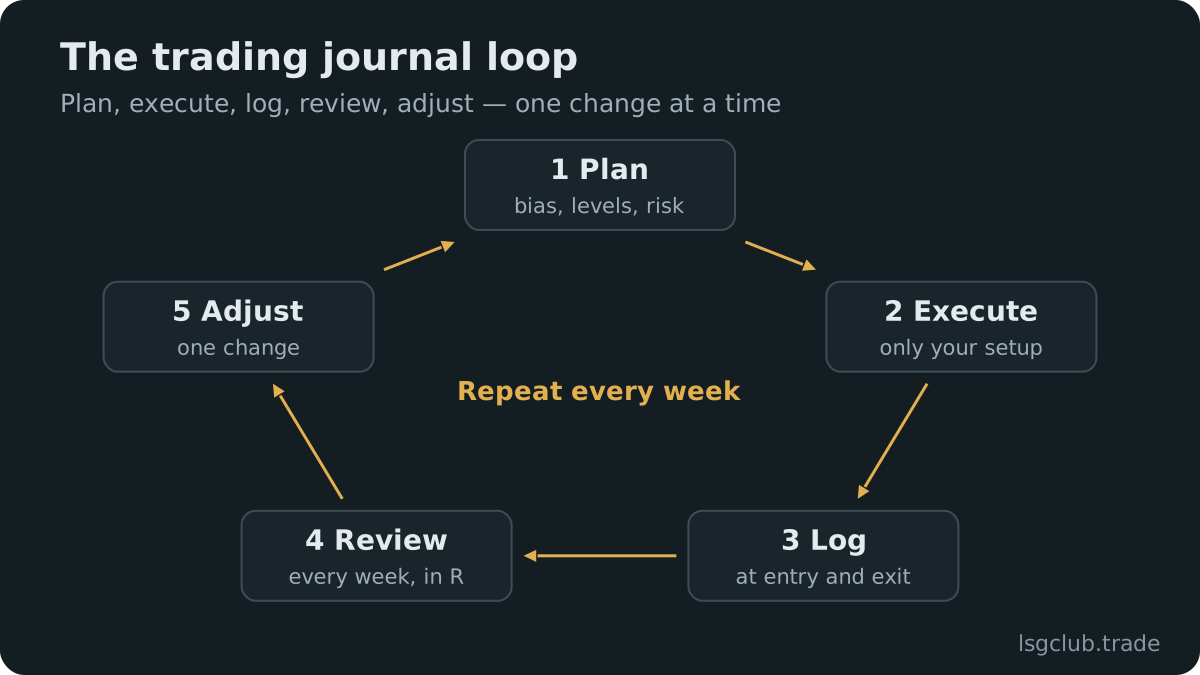
The full checklist with a scorecard is in how to choose a forex trading journal. If you are still deciding whether you need an app at all, read trading journal vs Excel or Google Sheets. You can also try LSG Club on the demo account with sample trades before importing anything.
FAQ
Is there a free alternative to TradeZella?
Yes. The LSG Club journal is free forever with no card, including R statistics, trade charts, analytics, planning and MT4/MT5 report import. TradesViz has a free Basic plan, but it covers stocks only, and one version of the Tradervue pricing page shows a free plan for up to 30 trades a month. See what the free LSG journal includes.
Does TradeZella have a free trial?
Its pricing page did not state a free plan or a trial when we checked in October 2026. Check TradeZella’s own site for the current terms; TraderSync, Tradervue and TradesViz each list a 7-day trial, and Edgewonk offers a 14-day money-back guarantee instead.
Which TradeZella alternative is best for ICT traders?
It depends on where you want the ICT work done. For backtesting ICT models on historical data, TradeZella itself is the strongest of the group. For a journal that groups your own trades by Kill Zone and ICT setup and shows them in R, free, LSG Club is built for exactly that; the ICT trading journal page shows how.
Which trading journals sync with MT5 automatically?
Of the journals compared here: TradeZella, TraderSync, TradesViz and LSG Club sync MT4/MT5 with the investor password or an FTP route; Edgewonk syncs MT4 by FTP report and MT5 through a read-only EA; Tradervue takes HTML report uploads. Details for LSG Club are on the MT5 trading journal page.
Is it safe to give a journal my MT5 investor password?
The investor password gives read-only access: a journal can read your history but cannot open or close trades with it. Never give a journal your main trading password. A report upload needs no password at all.